|
|
| Jade Multimedia for Mobile - Tutorials |
|
Online Tutorials 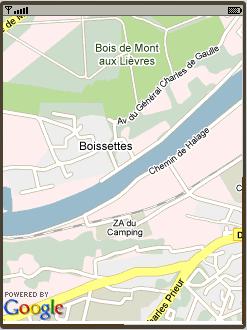
How to use the Google map image You can use the map from Google. To do that you just create an image object and set its source property to: http://maps.google.com/staticmap?center=48.8566667,2.3509871&format=png32&zoom=14&size=480x640&key=(your Google Map Key) You can get your Google Map Key from the site: http://code.google.com/intl/fr/apis/maps/signup.html center is the latitude and longitude position in degree of the map center. You can define two variables $lat_var and $lon_var to get a map in a position entered dynamically by the user: http://maps.google.com/staticmap?center={$lat_var},{$lon_var}&format=png32&zoom=14&size=480x640&key=(your Google Map Key Here) See the GoogleMapDemo.eman sample enclosed with the JM-Mobile Editor for more detail. From the version v1.3.15, JM-Mobile Editor allows to get the current GPS location of device through the system GPS variables such as $SysLastGPS.L, $SysLastGPS.G, etc. (see the GpsSysVar sample for more detail about the usage of the system GPS variables). You can use these system GPS variables to get the Google map of current position of device. You should just replace the $lat_var and $lon_var variables above by the $SysLastGPS.L, $SysLastGPS.G system GPS variables as like as the following URL specification: http://maps.google.com/staticmap?center={$SysLastGPS.L},{$SysLastGPS.G}&format=png32&zoom=14&size=480x640&key=(your Google Map Key Here) XML Data You can use the XML data to create your application. The XModel part allows declaring the XML data that will be used in your application. Using XML data you can:
List of JM-Mobile projects below are the good examples of the project using the XML data.
To declare a XML data, you insert into the XModel part a XInstance element. To specify a XML data source for the XInstance element using its FileName attribute: the XML data source can be a local or online XML file or an URL of a web service that can provide a XML data stream. Each XInstance element has an identity Name, which will be used to access into the XML data. The formula to access into a XML data represented by a XInstance element is following: {$XPath:document( XInstance Name )/XPath}, in some particular case such as in an expression, you can use a simpler formula document( XInstance Name )/XPath To access into the XML data you must use the XPath, there are only a common part of XPath supported. The XPath functions supported are:
Attention! The XML data source provided to the XInstance element must be the well-form XML data. memoryManager attributeThe XInstance element has the memoryManager attribute that can tell the system free or keep the XML data in the heap memory each time the application is changed to another scene. If the XML data is only used in a scene or some few scenes, it is recommended to use the free value. Otherwise if the XML data is the principal data for entire application then use keep value for the memoryManager attribute, the XML data will be always on the heap memory, the translation between the screens could be more fluid. However be really attention when using the keep value. The free is default value. Using XML DataBy example: The NewYorkTimes sample has a XInstance element named nytimesData representing the XML file following: You can get the set of item nodes in this XmlInstance by using the following specification: {$XPath:document(nytimesData)//item} Where: nytimesData is the name of the XInstance element. To get the total number of this node set of item, you can use the count function as following: count(document(nytimesData)//item) A dynamic menu can be created by using a XMenuTemplate or DMenuTemplate with this node set of item. 
In the newyorktime sample:
Hint: the index number of the selected menu item of a XMenuTemplate or DMenuTemplate dynamic menu can be gotten by using the function index( menu name ). This function is used in the item detail scene to specify the selected item of the DynamicMenu_6659 dynamic menu. See the XMenuTemplate part of the user's guide for more information about this object. 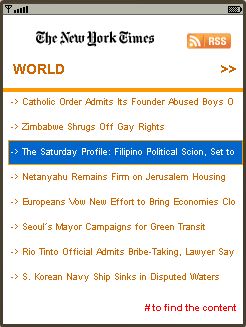
On the item detail scene, see the image on the right, the content of the text title is specified as following: {$XPath:document(nytimesData)//item[index(DynamicMenu_6659)]/title} Where: index(DynamicMenu_6659) is the index function to determine the number of the current selected item of the XML menu template (XMenuTemplate) identified as DynamicMenu_6659. The selected item is the 5th item, the text title content is so World Just under the text title there is another dynamic menu represents all articles of the World theme of the New York Time. This dynamic menu uses a XmlInstance of which the FileName attribute is variable following the selected item on the DynamicMenu_6659 dynamic menu, the FileName attribute is specified as following: {$XPath:document(nytimesData)//item[index(DynamicMenu_6659)]/link} That means if the selected item of the DynamicMenu_6659 dynamic menu is the 5th item, the nytimesItem XmlInstance is then connected to: http://www.nytimes.com/services/xml/rss/nyt/International.xml The dynamic menu in this detail item scene is also a XMenuTemplate named DynamicMenu_15479 of which the nodeSet attribute is specified as following: document(nytimesItem)//item 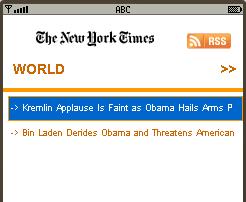
This specification will return all article of the selected theme. In fact on the New York Time there are many themes of which the number of the current articles could be great. So it will be great if in this scene there were a search content function. To do that the nodeSet attribute of the DynamicMenu_15479 menu could be specified as following: document(nytimesItem)//item/title[contains(.,'$searchContentVar')]/.. where $searchContentVar is the variable containing the text content which we want to search for. The specification above will return a list of the item of which the title contains the value of the $searchContentVar variable. By example if the value of the$searchContentVar variable is Obama the dynamic menu could be found the articles as showing on the image on the right.
Variable There are two kinds of variable: System and User variables: System variableIt’s a set of predefined variable representing the proprieties of the mobile-phone where the application is running on, for instance, System screen size or Language, etc. User variableIt’s a way to define, to keep and to modify the states of user's interactions. By now JM-Mobile provides two primitives variable types: STRING and INTEGER. Modify the user variableOn an event occurred (begin, end, key pressed, etc.) author can choose to modify a user variable. With an INTEGER variable author can choose to set, subtract or plus a value to the variable; with an STRING variable author can choose to concat or replace a new string to the variable Using variableUsing of variable make the presentation of application more dynamical. In general, to use a variable we put a $ at the beginning of the variable’s name (e.g. $myScore) and put it inside a pair of {}, e.g., {$myScore} Using variable in the text contentBy example: We have a variable called myScore that keeps a score of user. In the end of application we want to show this score, we can create a Text object and edit its text content as following: “My score {$myScore}” Using variable in the FileName attribute of an image objectThis application of variable allows changing to corresponding image content with the situation of the user’s interaction. By example: We have a string variable called stateOfMind that can take a “happy”, “sad”, “lovesick”, etc. then we want to show an image corresponding with a state of user in the application, we can create an image object with its FileName attribute specified as following: “…/res/images/{$stateOfMind}.png” Scene The structure of JM-Mobile project allows author to organize his/her project following the scenes, each scene presents a part, a period, a topic/subject of the multimedia project. There are two types of scene provided: GenericScene and SlideshowScene. The GenericScene is a neutral structure that allows to edit the general multimedia presentations. With the particular multimedia presentations such as Slideshow, Test, Quiz, Magazine, etc. if there are the particular scene structures for these particular presentations, the edition and management of these presentations will be much more easily. However, only the SlideshowScene structure is provided by default. If you want edit the other specific scenes please contact us at support@jm-mobile.com. Performance hint "Scene" provides the ways to structure your project in different parts that will be presented exclusively. Avoid creating the big scenes which contain many rich media such as images. The big scenes will make the time to initial them to be long, in addition these scenes maybe couldn't be loaded on the weak cell-phone systems. |
|