|
|
Hint: The authoring tool include many project samples. We recommend you to begin by seeing these samples.
The samples can be easily reached from the menu File->Open Sample Project of the JM-Mobile Authoring tool.
User's Guide for the versions 1.2.x (PDF)
 Version 1.3.45 - tested on Windows XP and Windows 7 (16/09/2013) Version 1.3.45 - tested on Windows XP and Windows 7 (16/09/2013)
 Free trial download immediately!
The trial version is fully functional and let you try the software in 10
days for free before you
buy. Enjoy! Free trial download immediately!
The trial version is fully functional and let you try the software in 10
days for free before you
buy. Enjoy!
New release features:
| - |
Improve the xml performance on the Android platform.
|
Version 1.3.43 - tested on Windows XP and Windows 7 (31/01/2013)
Release features:
| - |
Review all sample projects and have many corrections and improvements on the sample projects. :
- The problems have been occurred over the version evolutions of JM-Mobile Editor.
- And the improvements are done to be compatible with the new generation of smart-phones with the large and high density screen size.
|
| - |
add the LineNumber style attribute for the text element. |
| - |
add more options for the TextPosition style attribute of the XMenuTemplate. |
| - |
add the scale_center value for the fit style attribute of the image element. The scale_center value allows to keeping the original dimension ratio of the image. |
| - |
add SetFocusMenuItem action behavior that allows to set the focus on the XMenuTemplate menu. This feature is only supported on the Android platforms. |
| - |
add the xmlContent attribute for the XInstance element. |
| - |
many bugs fixed. |
Version 1.3.42 - tested on Windows XP and Windows 7 (04/01/2013)
New release features:
From this version, JM-Mobile introduces a new JM content format called jmk (JM Packaged document format). This new JM packaged content format jmk packages a jmm document and its all resources file in a file with the extension *.jmk.
| - |
All information and ressousrces neccessaires to play your content is packaged in one file. So you could easily exchange/distribute yours jmk mobile content files. |
| - |
The jmk document could be sent to your clients or your friends by Bluetooth or by email. Your clients/friends could then directly run this jmk document from the file system of theirs Smartphone or they could choose to install the document into theirs jmm document list of theirs JM Browser by choosing the Download -> Choose a *.jmk file menu of the JM Browser. |
| - |
You can put your jmk documents on a web server then make the hyperlinks to these documents from the web sites. Your clients/friends can directly play these jmk documents from the hyperlinks on these web sites if the Android JM Browser version 1.00.3 or later is installed on theirs Android Smartphone. |
| - |
To export your projects to this jmk document format please choose the Export to the packaged jm document for ... button on the toolbar. |
Version 1.3.41 - tested on Windows XP and Windows 7 (21/11/2012)
Release features:
| - |
Deactivate the item tool bar on the top. |
| - |
Fix some problems on the j2me and Android application generating. |
| - |
Fix the problem of editing with the midi audio files. That could block all application. Note that, the JM-Mobile Editor can't play the midi audio files, so if you use this audio format, you could only test the application on the mobile phones. |
| - |
Fix the problem of repeating value infinite on the Android. The playback was repeated only one time. |
| - |
Many improving in generating the Android APK applications. |
| - |
Please install the Android SDK tools r20 or higher if you want to export to APK applications for Android mobilephones.
|
Version 1.3.36 (18/03/2012)
| - |
An new object palette toolbar that allows to directly drage & drop a new object into your project's presentation.
|
Version 1.3.35 features:
| - |
JM-Mobile Editor allows now exporting the Android Applications (APK).
IMPORTANCE! the JM-Mobile Editor requires the Android SDK r15 installed on your PC to allow to generate the Android applications (*.apk).
Don't use the last Android SDK r17/18/19, it has the problem with the jar lib packaging. The problem will be fix in the next release of Android SDK r20.
for how to download and install the last Android SDK version, please visit the site web http://developer.android.com/sdk/index.html; for playing the generated android application on a simulator, you should create and start an AVD (Android Virtual Device) by using the Android SDK and AVD Manager (type android in a cmd window). For more information please visit the site web http://developer.android.com/guide/developing/devices/managing-avds.html . finally the AVD isn't powerful, some time it is very slow. So we strongly recommend to try the generated applications on real devices.
|
| - |
The generated Android Applications (APK) could work on Android devices version 2.2.x and higher.
|
Version 1.3.29 features:
| - |
Vertical/horizontal autoscrolling text: The text element has now two new styled attributes Wrap and AutoScroll.
- Wrap allows to define the wrapping text, default value is TRUE.
- AutoScroll allows defining the auto-scrolling texts if the size of texts is greater than the size of rendering region. Default value is FALSE
see the AutoscrollingTxts sample project enclosed within the JM-Mobile Editor.
|
| - |
Timer Event Behaviour: TimerEventBehaviour allows to define one or many actions performing one time or repeatedly in a timer (see the Timer&TimeSysVar project).
|
| - |
System variables:
- Time system variable, see the Timer&TimeSysVar tutorial project.
- Screen size and Pointer position (touche-enabled devices) variables, see the ScreenSysVar tutorial project
- GPS position (GPS-enabled device) variable , see the GpsSysVar tutorial project.
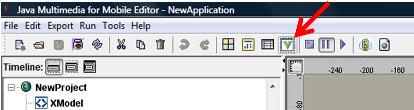
To get the list of the supported system variables, you should activate the system variable button on the tool bar, see the image below:
|
| - |
Set a variable depending on the other variables: Set a variable depending on the other variables by using the initValue attribute of the Variable, by example we can define a variable of which value is the current second of system plus 2 as following: initValue = {$SysTime.second} + 2.
|
| - |
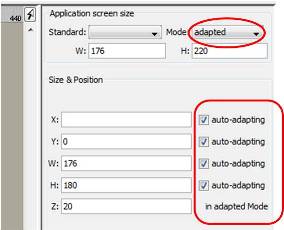
Auto-adapting the element's bounds: If the application screen size is in adapted mode, we can now specify the element's bounds auto-adapting on each element of the project.
|
|
Released features:
| - |
TimeInterval element is a simple object that provides the simple way to make the events (begin, end, key action, etc.)
|
| - |
Pointer events: support the pointer pressed event, the pointer released event, the pointer clicked event(the interval between pressed and released < 500ms).
See the Bosnalijek.eman project sample enclosed with the JM-Mobile Editor in the
Samples folder for more detail about how to use these pointers event.
|
| - |
JMM document hyperlink: We can make the hyperlinks between the JMM documents exported by JM-Mobile.
This allows you create a JMM presentation network on which the user can navigate as like as the web HTML document navigation
(try the hyperlink project sample).
|
| - |
XML features: XML data can be used to structure the resources of application. Using XML data can separate the interface and the resources of application.
The application resources can be then updated easily. See the NewYorkTimes sample enclosed in the JM-Mobile Editor (File->Reopen->NYTimes.eman).
The XModel, XInstance and XMenuTemplate objects is proposed to exploit all power of XML data. This system is adopted from XForms model of W3C.
See the NewYorkTimes sample enclosed in the JM-Mobile Editor (File->Reopen->NYTimes.eman).
-
XPath: using XPath to access into the XML data, but there are only a subset of XPath supported.
- support the substring function in the xpath such as document(data)//item[substring(@title,1,1) = 'A']. See Bosnalijek contact list sample enclosed with the JM-Mobile Editor for more detail.
- support the function boolean contains(string, string). The contains function returns true if the first argument string contains the second argument string,
and otherwise returns false. By example you can use the template by XPath following document(nytimesItem)//item/title[contains(.,'$Var_content')]/..
to filter the interested content from a Newyork time RSS category info. See the newyorktimes.eman sample eclosed with the JM-Mobile Editor for more detail.
-
XML data modification: the NodeModifyAction allows you to modify the value of a XML element or attribute. See the simple version of the Sodoku application enclosed with the Editor for more detail about the power of this feature.
- XML menu template: The textLineNumber style attribute of the XMenuTemplate allows to wrap the words in cell of an XMenuTemplate object,
so text in a cell will show in two rows, when cannot fit into one
See also the tutorial to know more about how to use these XML features.
|
| - |
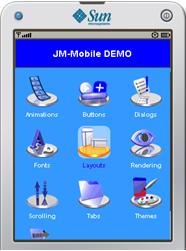
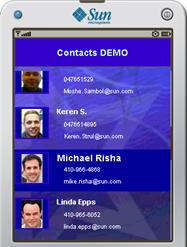
DMenuTemplate: the composite dynamic menu object, DMenuTemplate,
that allows to authoring the dynamical menu more complex and more sophisticated,
see the dynamicmenu and contactlist applications below:
|
| - |
PluginScene: new PluginScene object allows to plug in the JM-Mobile application your application. Your Midlet application must be implemented a set of JMMPlugin interfaces. A tutorial about this plugin interface will be available soon. You can see the addrSearchPlugin.eman enclosed with the JM-Mobile Editor for a sample.
|
| - |
Animation capacities: support many animation types such as AttributeAnimation, ColorAnimation, MotionAnimation and SetAnimation. See the aniMenu.eman sample enclosed with the JM-Mobile Editor for more detail.
|
| - |
ScrollGroup: the new ScrollGroup is introduced to replace the ListLayout.
The ScrollGroup supports the vertical, horizontal and absolute layouts.
See the ScrollingMap sample enclosed with the JM-Mobile editor for more information.
|
| - |
AbsLayoutMenu allows to place freely the menuitems. It can be scrolable if there are the menu items being out of the menu border.
|
| - |
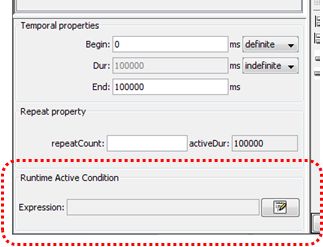
Logic expression: each object has now a logic expression attribute, that will be evaluated at the runtime when the object is activated. If the expression is false the object will be ignored.
The expression attribute can be considered as the conditional statement for the object or a group of objects. You can see the Kids Math Quiz project sample embedded with the JM-Mobile Editor to know how to used the expression attribute of an object.
Hint:
- the true has the value 1
- the false has the value 0
|
|
|
so we can make an expression as like as following:
(($var_1 = 3) + ($var_2 = 5) + ($var_3 = 1)) = 3
if var_1=3, var_2=5 and var_3=1 then the expression becomes:
((true) + (true) + (true)) = 3 <=> ((1) + (1) + (1)) = 3 <=> 3=3 <=> true
if var_3=7 then the expression becomes:
((true) + (true) + (false)) = 3 <=> ((1) + (1) + (0)) = 3 <=> 2=3 <=> false
|
|
|
| - |
Video and audio editing are enhanced
note:
- Many the real devices today just supports only the *.3gp video
- The WTK Simulator can't playback the *.3gp videos, however these video will be correctly played on the real device that supports multimedia for java (mmapi)
- We can also use the video from distance (internet). However the editor can't playback the *.3gp from distance, but the exported application can play correctly the video on the real devices.
- The editor can playback the *.mpg from distance and then the simulator can also playback it, but on the real devices only the *.3gp are supported
- please try to edit the video object with the following distance videos:
- http://java.sun.com/products/java-media/mma/media/test-mpeg.mpg
- http://video.cityneo.com/videoperso/61.3gp
|
| - |
Var: the Var object can be now persistent. If you want the value of a VAR is saved between the application's uses, you can choose the value of the attribute isPersistent being true
|
| - |
Support multiple key access events on an object.
|
| - |
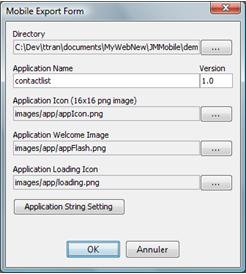
The mobile export setting is more complete, that allows to choose to personalize more the applications, such as changing:
- the application icon
- the application welcome/flash image
- the application loading/busy icon
- the application string by defaut: Exit, Back, etc.
|
|
| - |
Comunication with the Bluetooth media on demand server:
- We can get the XML data that describes the content of the JM-Mobile Bluetooth media server by using the XInstance with the FileName attribute as following btspp://bluetooth_address (by example btspp://000A9411CCC1). We can use this XML data to create the dynamic menu to explore the media of the JM-Mobile Bluetooth Media server. See the BtMediaServerBrowsing application for more detail.
- The new action GetFileByBluetoothAction allows to specify a file to get from the JMM-mobile Bluetooth server through the bluetooth connection. See the bluetoothGetFile sample enclosed with the JM-Mobile editor. The Jmm-mobile bluetooth server will available soon.
Note: when you try the bluetoothGetFile sample with the Jmm-mobile bluetooth server, please change the Bluetooth server address field of the getFilByBluettoth action by your Jmm-mobile bluetooth server address, that can be found on the top of your Jmm-mobile bluetooth server window.
|
| - |
The application can now automatically alert you the new version available. You can check an availability of the new version by using the menu Help -> Check a new version
|
| - |
If you use the dynamic media, of which the resources are only determinate at the running time,
you must add a set of the resources available for these dynamic media through the AdditionalRes object.
The new object AddResGroup of the AdditionalRes object allows you to choose in one time many resources in a same folder.
|
| - |
Image object:
- The Image object can use the source from the internet(src="http://www...")
-
The fit image style attribute allows users to choose a solution to present the image when the region of image is expanded larger than the intrinsic size of image.
The fit attribute can have one of four values: center, repeating, rescaling, top-left (see the image below).

By default fit has the value center.
Attention: using rescaling value will make your application to be gravely slow down! Only using this value when you are sure that your applications will be run on the power devices (the last generation cell-phones).
-
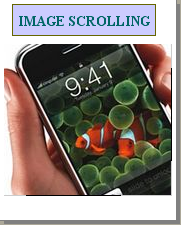
The two style attributes VScroll and HScroll allow to define the scrolling images if the size of the images is greater than the size of the region where they are displayed.
Use the 2, 8, 4 and 6 keys for UP, DOWN, LEFT and RIGHT scrolling. Attention, avoid to have more than one scrolling object (image or text) displaying in a same time.
The application beside shows an iPhone picture in scrolling.
|
|
| - |
BitmapTextIcon: the BitmapTextIcon object that uses the bitmap font.
The Bitmap Font Generator tool integrated with the JM-Mobile Editor can help you create easily the bitmap font for using with this object.
This tool be accessed from menu tools->Bitmap Font Generator ...
- The mobile java font system is implemented very different on different java-enable cell-phones.
Using the bitmap font will help you manage the text displaying problems and make your applications to be displayed correctly on different cell-phones.
- However you must be careful when using the bitmap font! Don’t use too many bitmap fonts that will decrease the performance of your application.
|
| - |
The list layout objects like TextList, ImageList, and ListLayout can now scroll up/down or left/right when they are exported and playback on the mobile-phones.
In particular, the text objects in the vertical TextList and vertical ListLayout will be resolved dynamically their height attribute to show all text,
the next objects will be automatically moved down.
attention!: The scrolling and automatic resolving can be done only on the mobile-phones/emulators, they can’t be done on the editor.
|
|
| - |
The FlowLayoutMenu can now scroll up/down or left/right,
if the focused MenuItem is out of the parent visible region, the MenuItemList (try the project sample).
|
|
| - |
The menu can now memory the focused item for the turn back.
|
|
| - |
Fix some compatibility bugs on Nokia and Motorola mobile-phones.
|
|
| - |
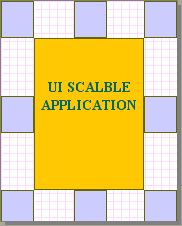
We can now edit the scalable applications which can adapt their UIs to the screen size of the cell-phones.
to make an application scalable you select RootProject object (the first element of the hierarchic tree)
then choose the adapted value for the AppScreenSizeMode attribute.
You can test your application in deferent screen size by change the system screen size of your application. Download the sample application in the next side to see how it works.
Attention!:
- by the cause of performance of the handset processors,
all images in your applications won't be resized.
The image resizing function is deactivated,
in the future this function can be reactivated if the powered cell-phones become more popular.
- the text size isn't resized too.
|
 |
| - |
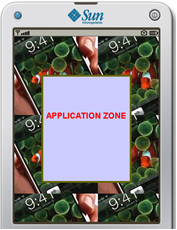
The RootProject object (the first element of the hierarchic tree) has now three attributes ApplicationAlign, PhoneBgcolor and PhoneBgimage that allows to align and decorate the display of the application:
- ApplicationAlign attribute allows to align the display of application on CENTER, NORTH or NORTH-WEST direction;
- PhoneBgcolor and PhoneBgimage attribute allows to decorate the non using space of the cellphone's screen
The application beside shows an iPhone image used as the phone background.
By now, users can't see the presenting of these attributes on the JM-Mobile Editor's screen. He/she can only verify them on the simuators or the real cell-phones of which the screen size must be greater than the application's size
|
|
| - |
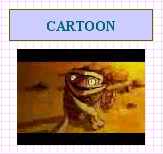
The video format 3gp can now display on the JM-Mobile Editor. However the audio of the 3gp video can't be played yet, but on the real cell-phones we can see both video and hear the sound of the video.
|
|
| - |
A new action called Hyperlinkaction is provided. It allows to launch a default internet browser of the mobile-phones to:
- browse a page web
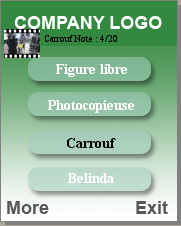
- download an URL resource (image, video, audio, etc). The Video on Demand sample application on the next side provides a menu list that the users can select one item of the menu to download a video through an URL address from http://video.cityneo.com/videoperso/xxx.3gp
- send the data result of the user interaction (e.g. result of a test, a user note, etc. ) to a Web server
- send email (using mailto:youremail@domain.com).
- etc.
|
|
|
- fix the refreshing bug: some mobilephones can't refresh the back screen when users do the Back command
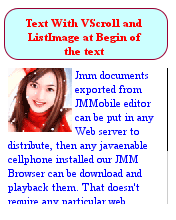
- authors can now add an image at begin of text, use the ListImage style attribute of the text object (see the next picture)
- the text can scroll now by specifying the VScroll attribute of the text style equal true
- the scroll bar is only displayed when the text's size is super than the text's area;
- when the scroll bar is displayed, we can use key NUMBER2 and key NUMBER8 to scroll UP and DOWN the scroll bar.
- see the next picture
|
|
|
- Font coding bug fixed, now we can export the project with a font coding specified, see Export->Set export encoding (default font coding is UTF-8).
|
|
- add more font encoding for project exporting, see Export->Set export encoding.
- allow to use two function buttons in the bottom left and right corners of the mobile phones. They are labled SOFT1 and SOFT2 in the keys functions list of the editor. On the playback mode of the editor you can use the F11 and F12 to simulate these function keys. Attention! if these two function key are in use the default system menu of application will be deactivated.
- support the ExitApplication action that allows to create an exit point in your project.
|
|
- support the commandline mode, type jmmobile.exe -h for more detail. The commandline mode is important to create an automatic exportation system.
- support the audio and video objects, the JMF must be installed on your PC (JMF can be download here). Attention! the audio and video support in this version have following limitations:
- only exported midllet applications can playback audio and video objects. The jmm document exported cannot playback these media yet.
- the video format *.3gp cannot be presented neither on the editor nor on the WTK simulator. But the video *.3gp can playback on the real phones that support the mmapi.
- the Sun Java WTK simulator cannot playback the exported applications that contain audio or video object.
- the audio and video media have always a big size and by now they cannot playback on some mobile-phones, so be careful when using these media if you want your projects more portable.
|
|
- the form element in which we can create the text-inputs and the buttons elements.
- the variable element that allows to keep a user value, a text-input value or a state of user navigation/interaction, etc.
- to set or to change the value of a variable, we can use the variable modify action of an event.
- the content of a text, the src attribute of an image elements or the attribute of an action can contain one or more variable as following {$name_of_variable} that can make your presentation more dynamic, see the greeting_card.jmm sample.
|
|
|