|
|
 download download
 |
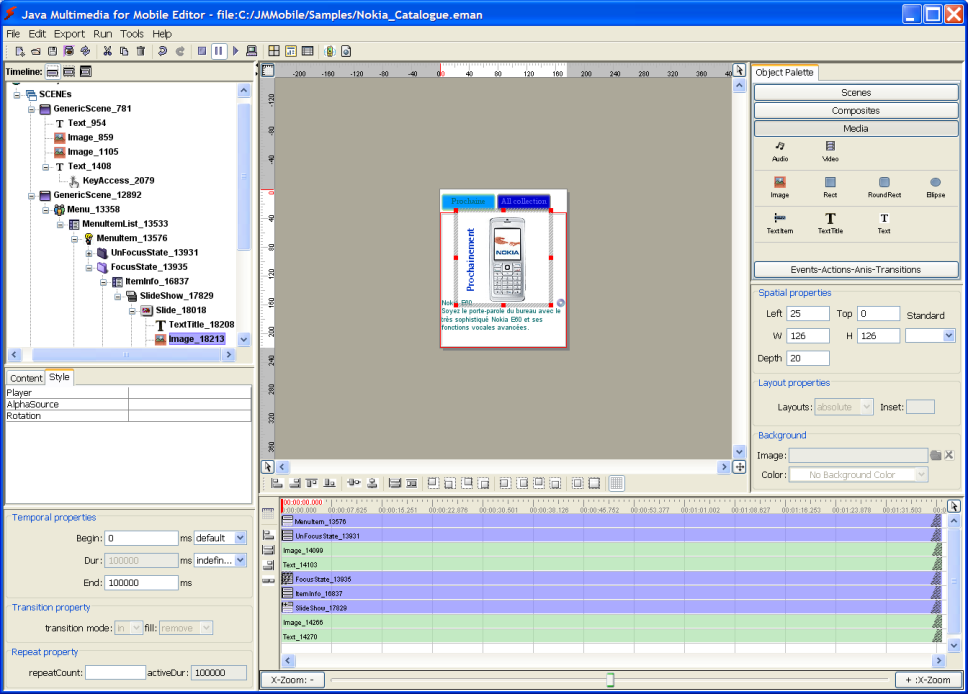
JM-Mobile Editor is a graphical multimedia
authoring tool. It enables non-programmers such as designers to build and to produce the complex and sophisticated multimedia presentations for the different handset devices: Nokia/BlackBerry (java-enable devices), Android devices and Apple devices (iPhone/iPad).
Author has a built-in graphic engine that allows to easily create not only the Graphic User Interfaces (GUI) but also the time, the layout and the navigation presentation scenarios.
JM-Mobile Editor provides a hierarchy structure management allowing easily creating and managing the complex mobile interactive projects. Thank to this hierarchy structure management your interactive projects could be extended and improved very easily.
|
Major Features
- The WYSIWYG environment for designing the interactive mobile content in a few mouse clicks,
- The big and complex applications can be easily edited, managed and maintained: the complex interactive presentations such as Slideshow, Menu, Form, etc. can be easily created.
- The editing mode can be easily alternated with playing mode allowing authors to verify immediately the editing result without a compilation and a mobile simulator.
- The authoring tool is applied the advanced synchronisation, integration and interaction multimedia models of the SMIL standard technology from W3C. In addition, the interface allows to hide the complex technics of SMIL from the users.
- The application can be authored once in JM-Mobile Editor, then it can be generated in different native applications for different type of handset: Nokia/BlackBerry (java-enable devices), Android devices and Apple devices (iPhone/iPad).
- Supports the definition of the editing font system to match more with the font system on the real handset devices.
- It supports bitmap fonts and provides a bitmap font generation tool. By using the bitmap fonts, the authors are assured the presentation of their applications on the different real mobile-phones.
- Supports the media image (png, jpg, gif, etc.), audio (wav, midi, mp3, etc.), video (3gp, mpg, etc.), text and geometry.
- Supports xml data. Hence you can easily organize the application data, separate the application data from the application structure, and then the application data could be easily updated, no need for application modification and/or recompilation.
Deployment Models
The multimedia presentations/applications authored by using JM-Mobile Editor can be deployed in two different ways:
-
in the native applications: Android application (*.apk) and java Midlet applications (*.jar), that can be downloaded directly into the handset devices or can be uploaded on the Web servers to distribute largely;
-
in the JM-Mobile Documents (a private format),
that can be uploaded on the Web server, then can be downloaded
and playback on the mobile-phones that are installed our
JM-Mobile Browser.
The JM-Mobile Document deployment is more flexible than the
native application deployments. It allows you and your clients updating easily
the new contents of the applications. The java native application deployment requires that your clients must reinstall the applications each time
their content is updated.
Requirements
- System:
- Processor 1GHz or higher
- Windows NT, 2000 or XP
- 256 MB recommended of free available system RAM
|
|