|
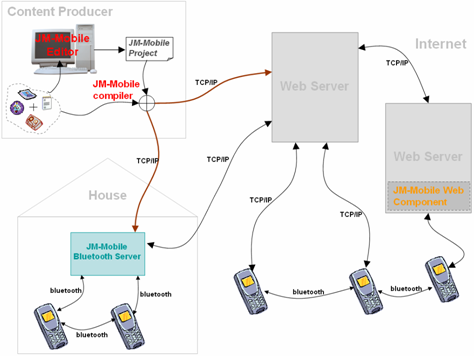
JM-Mobile Web Component
Jmm documents exported from JM-Mobile editor can be put in any Web server to distribute,
then any java-enable cell-phone installed our JMM Browser can download and playback the Jmm documents from the web server.
That doesn't require any particular web component installed on the Web server side.
However if you need a more sophisticated distributing system we can provide you a JM-Mobile Web component which can:
- distribute the jmm content according to each type of mobile-phone
- receive and analyse the resultants from the mobile-phones
- and many more according to your requires
|
JM-Mobile Bluetooth Server
JM-Mobile Bluetooth Server provides the easy and wireless ways to distribute the
multimedia content and the multimedia interactive content/application to the consumers who are
approximate to a location.
JM-Mobile Bluetooth Server provides a set of functionalities as:
- Bluetooth Push server,
- Bluetooth media on demand server and
- JM-Mobile document on demand server.
JM-Mobile Bluetooth Server in trying DEMO mode is available to download  .
The DEMO mode doesn't allows to modify the broadcasting and the distributing data of the server. .
The DEMO mode doesn't allows to modify the broadcasting and the distributing data of the server.
JM-Mobile Bluetooth Server user's guide is available to download .
|